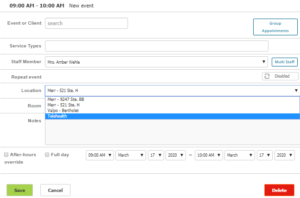
- When the appointment is created, the location needs to be “Telehealth.”
- While you are in your video session, you will still need to collect any payments that are due at the time of service (i.e. co-pay, etc.) by accepting a credit card.
- You can do a split screen on your end to collect the payment.
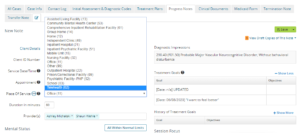
- When you start the note, under Place of Service (POS) will need to be changed to 02 – Telehealth.
- The note will need documentation of where you and the client are located. You will need to ask the client every session where they are and document that. You will also need to let the client know where you are and document that as well. Please put the full address, example: If they are home, put their full address.
- If you are needing to update the treatment plan (TP), the client usually needs to sign the note in session. However, in this event, you will need verbal consent to sign the client’s name with telehealth behind it (i.e. John Doe – telehealth).
- Your TP should also state that it was done through telehealth.
- Your notes also need to indicate that it was a telehealth session in every note.
Change the Location